

Every control, one click away
The cover sits between your taskbar icons. Click it and the player slides out next to it, with the volume of the app that is playing.
The cover of whatever is playing sits on your Windows taskbar. Click it for the controls and Spotify lyrics. Paint it in your own colours and GIFs, and keep it on screen even over your games.
This is a live copy of the player: play, skip and drag the seek bar. Every song repaints the page.

Previous, play / pause, next, a seek bar, the volume of the app that is playing, shuffle and repeat. Click the cover to open it, drag it along the taskbar to put it where you like.
The cover sits between your taskbar icons. Click it and the player slides out next to it, with the volume of the app that is playing.
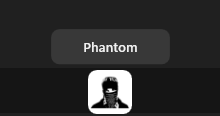
Rest the mouse on the cover for a second.
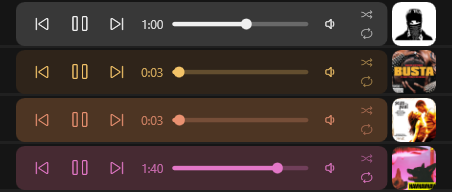
Every song paints the player in its own colours. We call it Chameleon.

The open player shows the line being sung; turn it off under Lyrics in the tray menu. Move the mouse over it to get the buttons back.
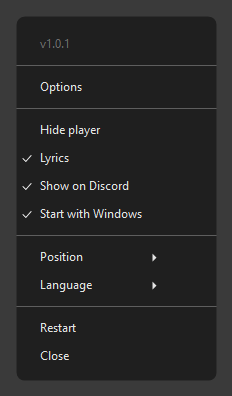
Options, hide player, lyrics, equalizer, Discord, startup, side of the taskbar and 11 languages.
Turn on Free move to drag the cover anywhere on the screen, and Show over games to keep it over full-screen games. While a game hides the cursor, clicks go to the game. Ctrl + Alt + X takes the mouse out of the game to skip a song. With Free move on, the player can also be up to 300 % bigger.
Each saved player remembers its side, its spot, Free move, its size and Show over games, and comes back just as you left it.
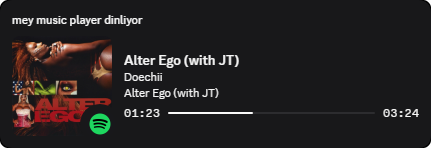

Your friends see what you're listening to: the title, artist and album, a progress bar and the cover. Works with Spotify, Apple Music, Deezer, TIDAL, YouTube Music, SoundCloud and more. Videos stay private.
20 bands like AIMP, ±15 dB, a preamp, presets and effects: bass boost, stereo width, balance, reduce vocals. Heard at once, in every app. Works through the free Equalizer APO, which MMP can download and start for you.
Open Options from the tray menu. Everything you change shows up on the taskbar at once and is saved on its own.

No account.
No ads.
No tracking.
MMP is free and open source under the MIT license. Here is everything it ever sends over the internet:
github.comChecks for a new version when it starts and once a day.lrclib.netOnly with Lyrics on: the title, artist, album and length of the Spotify song, to find its lyrics.deezer.com · apple.com · soundcloud.comOnly with Show on Discord on: the title and artist of the song, to find its cover for Discord.sourceforge.netOnly when you click Download and install in the Equalizer window: Equalizer APO's setup.anything elseNothing. Even the error log stays on your PC.Get MMP.zip from the latest release on GitHub.
Extract it and double-click MMP Launcher.bat. Nothing else needs to be installed.
Use the mey music player shortcut on your desktop. From then on it starts with Windows, and asks you before it updates.
Windows 10 (1809 or newer, 64-bit) and Windows 11.
The app is not signed with a paid certificate yet. Choose More info, then Run anyway. The code is all on GitHub.
Anything that shows up in the Windows media controls: Spotify, browsers (Chrome, Edge, Brave, Opera, Firefox) playing YouTube or SoundCloud, and most music and video players. Lyrics are for Spotify only.
MMP changes the app's volume in the Windows volume mixer, which sounds the same. In a browser all tabs share one volume, and Firefox's volume can't be changed from MMP.
On the taskbar MMP sits on the main screen, at the bottom or the top. Turn on Free move in Options to put it anywhere, on any screen.
The code is all on GitHub. Every release is built from it by GitHub Actions and comes with its SHA-256. MMP updates only from those releases, checks the SHA-256 first and asks you before it updates.
Turn off Start with Windows and choose Close in the tray menu, then delete the %LOCALAPPDATA%\MMP folder and the desktop shortcut.